
Loading...
PACHAMA INSIGHTS

Dynamic Baseline

Assess the baseline scenario with AI and remote sensing powered tooling.

Dynamic Control Area Baseline

About our tech

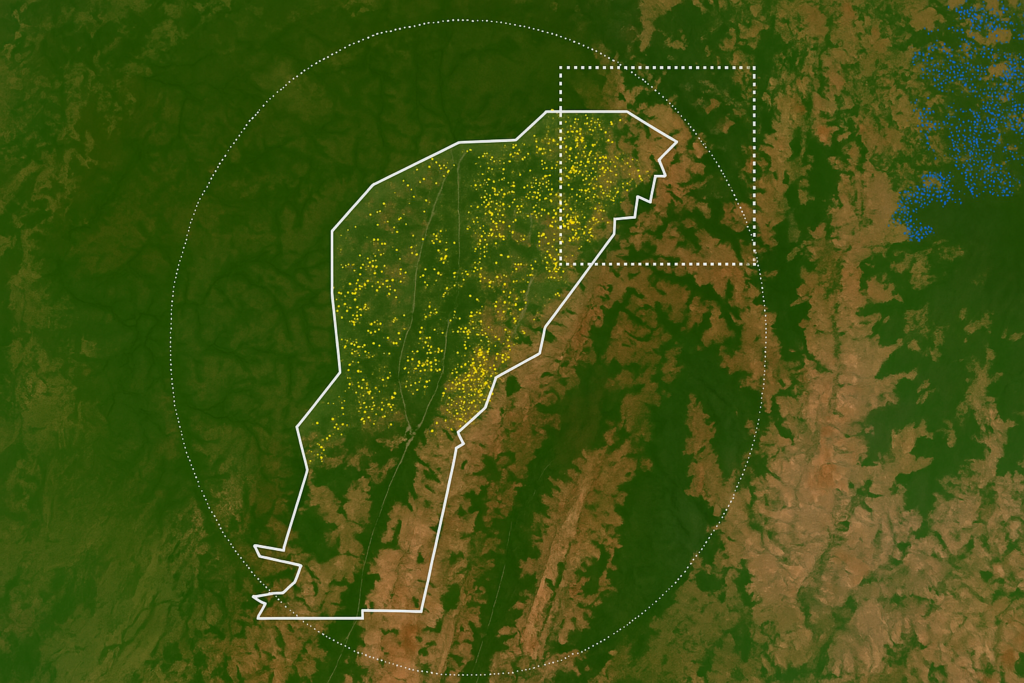
Pachama’s Dynamic Control Area Baseline (DCAB) dynamically estimates carbon impact by using satellite data and AI to first select a control area representative of the project and then observe forest change in the control and project areas over time.

Our DCAB was the first-ever AI tool to dynamically calculate baselines for forest carbon projects and critically quantify the uncertainty of estimates. 
  • Why baselines matter

    A baseline represents a business-as-usual scenario used to estimate expected removals or emissions in the absence of a project. The baseline scenario is one of the most critical components in determining whether a project has a net additional climate benefit.

    Historically, baselines have relied on predictions derived from historical trends, but new dynamic baseline technology has unlocked the ability to observe baseline trends over time. If a project has high forest regeneration rates in selected baseline areas then it can have high credit delivery risk.

    step2cleanv2
  • Pachama’s evaluation approach

    We use machine learning and geospatial data to select a control area representative of the project, and then compare changes in the project and control areas over time. 

    For REDD+ projects, we compare observed forest loss in the control and project areas and assess whether the project-reported baseline is more conservative than the Pachama-estimated baseline. For ARR projects, we use canopy height maps to analyze stocking index trends for both areas, 8-10 years before the project start, to determine if forest cover is increasing or decreasing.

    step2cleanv2
  • How you can use baseline insights
    • Evaluate project baseline accounting before purchasing credits or making an investment to assess additionality and delivery risk.
    • Get everything you need to build a compelling case for your dynamic baseline in your Project Design Document (PDD).


    step2cleanv2